Bookings that check for real conflicts, not just double-clicks
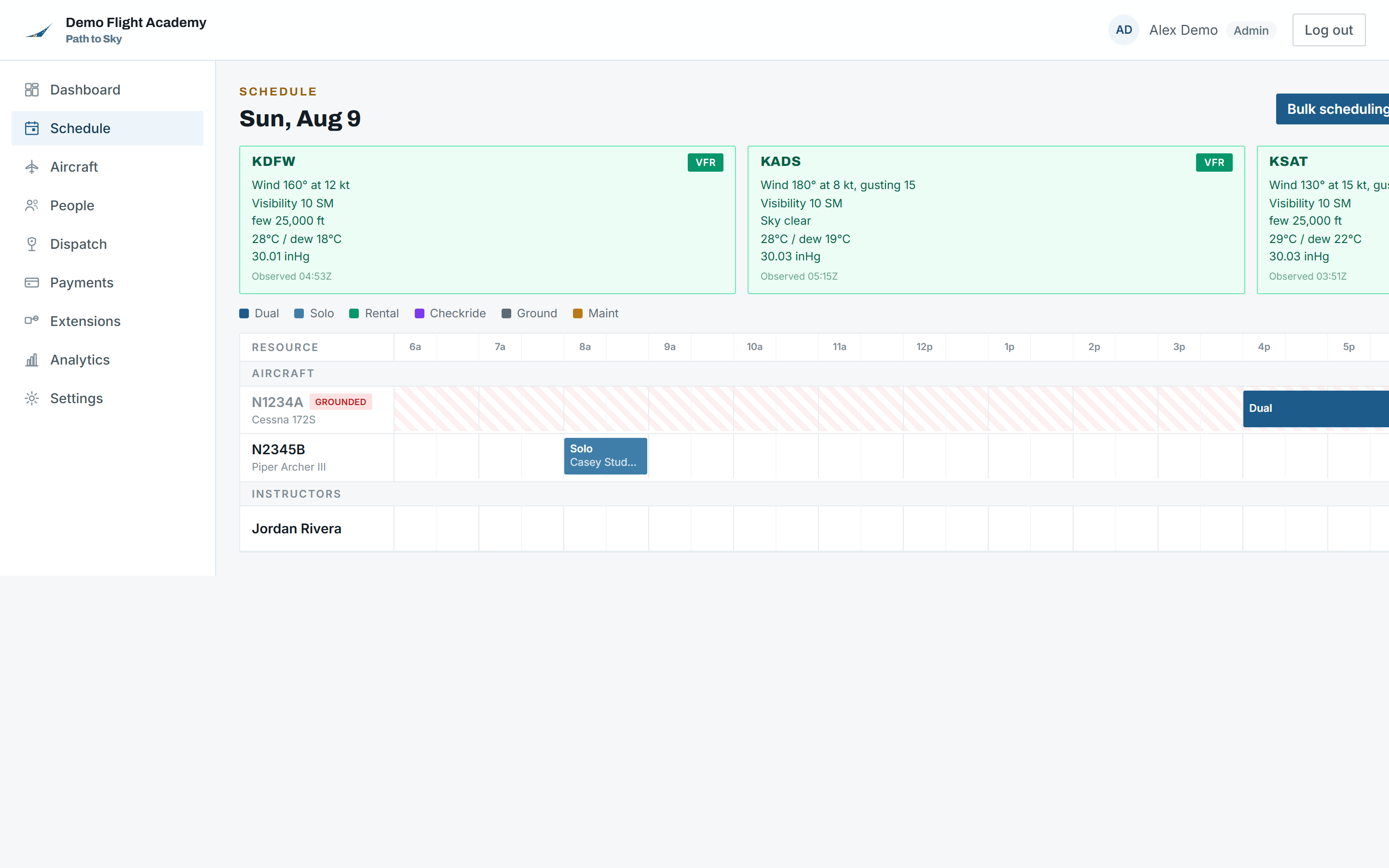
One timeline for the whole operation: aircraft down one axis, instructors below them, the day across the top. Every booking is checked before it saves, not after someone walks out to a grounded airplane.
Used by: Front desk, chief instructor, club secretary, anyone who answers the phone
pathtosky.com/schedule
What it does
Every line below is something in the product today, not on a roadmap.
Booking the flight
A day timeline showing every aircraft and instructor side by side, with bookings colored by type: dual, solo, rental, checkride, ground, maintenance.
Click an empty slot to book it. The form is prefilled with the aircraft and instructor whose row you clicked.
Booking types carry their own rules, so a solo booking and a maintenance block behave differently rather than being the same event with a different label.
A booking can be tied to the specific syllabus lesson it is for, which then follows through to the invoice and the logbook entry.
Bulk scheduling lays out a recurring block of lessons for a student and picks an available aircraft for each one.
What gets checked before it saves
Aircraft, instructor, and student are each checked for an overlapping booking, and any maintenance window on that aircraft is checked too.
Grounded, in-maintenance, and retired aircraft are hard-blocked from being booked at all, with the reason named.
Per-aircraft requirements are enforced against the pilot: required certificates, whether the airplane is rentable to renters or students only, and a per-person block list you control.
A named instructor has to actually be an active flight instructor at your operation, so nobody can dodge a solo endorsement rule by typing an id into the field.
Certificate levels count upward, so a commercial pilot satisfies a private requirement. A multi-engine rating has to be held outright unless an MEI is on board.
Instructor unavailable windows and student available/preferred windows are respected by bulk scheduling and flagged on manual bookings.
Conditions and follow-through
Decoded METAR for your home field and any other airports you operate from, sitting above the timeline with a VFR, MVFR, or IFR category on each.
A conflict on a booking is shown on the booking itself, with the other flight it collides with, and can be rescheduled or cancelled from there.
Students and members see their own bookings, and self-booking can be allowed or not, per operation.
Cancelling records who cancelled it and why, clears the conflicts that no longer apply, and takes the flight off both the calendar and the dispatch board in one step.
What it does not do. Conflicts warn rather than block. An operation sometimes genuinely wants to double-book a tail number, so the software says so loudly instead of refusing.